
The Symfony binary also provides a tool to check if your computer meets all requirements.

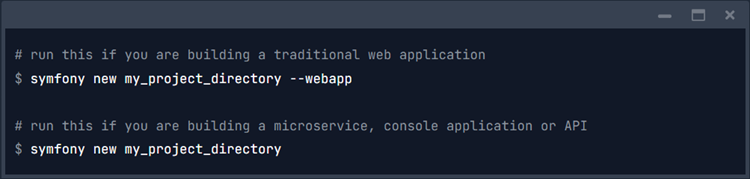 The only difference between these two commands is the number of packages installed by default. The web app option installs all the packages that you usually need to build web applications, so the installation size will be bigger.
If you’re not using the Symfony binary, run these commands to create the new Symfony application using Composer:
No matter which commands you run to create the Symfony application, all of them will create a new my_project_directory/ directory, download some dependencies into it, and even generate the basic directories and files you’ll need to get started. In other words, your new application is ready!
The only difference between these two commands is the number of packages installed by default. The web app option installs all the packages that you usually need to build web applications, so the installation size will be bigger.
If you’re not using the Symfony binary, run these commands to create the new Symfony application using Composer:
No matter which commands you run to create the Symfony application, all of them will create a new my_project_directory/ directory, download some dependencies into it, and even generate the basic directories and files you’ll need to get started. In other words, your new application is ready! 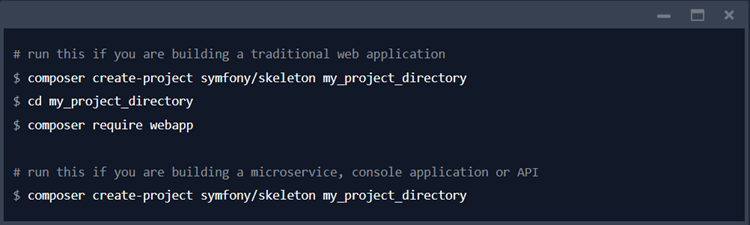

 This is possible because lots of Symfony packages/bundles define “recipes”, which are a set of automated instructions to install and enable packages into Symfony applications. Flex keeps track of the recipes it installed in a Symfony.lock file, which must be committed to your code repository.
Symfony Flex recipes are contributed by the community and they are stored in two public repositories:
●The main recipe repository is a curated list of recipes for high-quality and maintained packages. Symfony Flex only looks in this repository by default.
●The Contrib recipe repository contains all the recipes created by the community. All of them are guaranteed to work, but their associated packages could be unmaintained.
Symfony Flex will ask your permission before installing any of these recipes.
Read the Symfony Recipes documentation to learn everything about how to create recipes for your packages.
This is possible because lots of Symfony packages/bundles define “recipes”, which are a set of automated instructions to install and enable packages into Symfony applications. Flex keeps track of the recipes it installed in a Symfony.lock file, which must be committed to your code repository.
Symfony Flex recipes are contributed by the community and they are stored in two public repositories:
●The main recipe repository is a curated list of recipes for high-quality and maintained packages. Symfony Flex only looks in this repository by default.
●The Contrib recipe repository contains all the recipes created by the community. All of them are guaranteed to work, but their associated packages could be unmaintained.
Symfony Flex will ask your permission before installing any of these recipes.
Read the Symfony Recipes documentation to learn everything about how to create recipes for your packages. 

Learn more about our expertise and solutions on our Shopware page, where we share valuable information for growing your e-commerce business.